HOME » Page 6

Blog

  • How to write better email marketing copy?

    How to write better email marketing copy?

    Writing effective email marketing copy is a blend of art and science. It’s about capturing attention, building relationships, and driving action. Here’s a comprehensive guide to help you write better email marketing copy:

    1. Master the Subject Line: Your First Impression

    The subject line is arguably the most crucial element. If it doesn’t grab attention, your email won’t even be opened.

    • Keep it Concise: Aim for 30-50 characters. Most inboxes truncate longer subject lines.
    • Create Urgency/Scarcity (when appropriate): “Flash Sale Ends Tonight!” “Only 5 Spots Left!”
    • Spark Curiosity: “You won’t believe what we found…” “A secret to better sleep.”
    • Personalize (if possible): “[Name], a Special Offer Just for You!”
    • Use Emojis (sparingly and strategically): A relevant emoji can stand out, but don’t overdo it.
    • A/B Test: Always test different subject lines to see what resonates best with your audience.
    • Avoid Spam Triggers: Words like “free,” “winner,” “guarantee,” excessive caps, or multiple exclamation points can land you in the spam folder.

    2. Craft a Compelling Preview Text (Preheader):

    This is the short snippet of text that appears after the subject line in many inboxes. It’s a second chance to entice opens.

    • Complement the Subject Line: Don’t just repeat it.
    • Provide More Detail: Expand on the subject line’s promise.
    • Create a Call to Action (CTA) or Benefit: “Click here to unlock your discount.” “Discover how to save more.”

    3. Personalize and Segment: Speak Directly to Your Audience

    Generic emails often get ignored. Personalization goes beyond just using a name.

    • Use Customer Data: Leverage purchase history, Browse behavior, demographics, and preferences.
    • Segment Your List: Send targeted emails to specific groups based on their interests or where they are in the customer journey. For example, new subscribers get welcome emails, repeat customers get loyalty offers.
    • Dynamic Content: If your ESP allows, use dynamic content blocks that change based on the recipient’s data.

    4. Focus on Benefits, Not Just Features:

    Customers care about what your product or service can do for them.

    • Features: What your product is. (e.g., “Our software has a built-in analytics dashboard.”)
    • Benefits: What problem your product solves or how it improves the customer’s life. (e.g., “Gain crystal-clear insights into your website traffic and make data-driven decisions to grow your business.”)

    5. Write Engaging Body Copy:

    Once opened, the body of your email needs to keep them reading.

    • Strong Opening Hook: Start with a question, a surprising statistic, a relatable problem, or a compelling statement.
    • Clear and Concise Language: Avoid jargon and overly complex sentences. Get to the point quickly.
    • Scannable Content: Use:
      • Short Paragraphs: Break up large blocks of text.
      • Bullet Points and Numbered Lists: Easy to digest information.
      • Bold Text: Highlight key phrases or benefits.
      • Subheadings: Guide the reader through the content.
    • Tell a Story: Stories are memorable and create an emotional connection.
    • Maintain Brand Voice: Consistent tone, style, and personality.
    • Solve a Problem: Address a pain point your audience has and offer your solution.
    • Build Trust and Credibility: Include testimonials, social proof, or expert endorsements if relevant.

    6. Craft a Clear and Compelling Call to Action (CTA):

    What do you want your readers to do next? Make it crystal clear.

    • Be Specific: Instead of “Click Here,” try “Shop Now and Save 20%,” “Download Your Free Guide,” or “Book Your Demo.”
    • Make it Prominent: Use a button, contrasting color, or bold text.
    • Create Urgency/Scarcity (if applicable): “Limited Time Offer,” “Sign Up Before it’s Too Late.”
    • Use Action-Oriented Verbs: “Get,” “Learn,” “Discover,” “Start,” “Buy.”
    • Repeat the CTA: Place it strategically throughout longer emails, but don’t overdo it.

    7. Optimize for Mobile:

    The majority of emails are opened on mobile devices.

    • Responsive Design: Ensure your email looks good on all screen sizes.
    • Large, Tappable Buttons: Easy to click on a small screen.
    • Concise Copy: Mobile users have shorter attention spans.
    • Small Image Sizes: Faster loading times.

    8. Test, Analyze, and Iterate:

    Email marketing is an ongoing process of improvement.

    • A/B Test Everything: Subject lines, CTAs, images, layouts, send times.
    • Track Key Metrics: Open rates, click-through rates, conversion rates, unsubscribe rates.
    • Analyze Data: Understand what’s working and what’s not.
    • Segment Based on Engagement: Send re-engagement campaigns to inactive subscribers.
    • Learn from Competitors: See what successful brands in your niche are doing.

    9. Professionalism and Legality:

    • Sender Name: Use a recognizable sender name (e.g., “Your Company Name” or “John from [Company]”).
    • Physical Address: Include your company’s physical address (required by CAN-SPAM Act).
    • Unsubscribe Link: Make it easy for people to unsubscribe (also legally required).
    • Proofread Carefully: Typos and grammatical errors erode credibility. Get a second pair of eyes.

    By consistently applying these principles, you’ll be well on your way to writing email marketing copy that not only gets opened but also drives meaningful results for your business.

  • Useful AI tools for everyday productivity

    Useful AI tools for everyday productivity

    To enhance productivity, streamline workflows, and foster collaboration, here are some key AI tools every team should consider knowing and leveraging:

    1. Communication & Collaboration Platforms with AI Integration

    Many popular team platforms are now integrating AI to improve efficiency.1

    • Microsoft Teams / Google Workspace (with Copilot/Gemini): These suites offer AI assistance for drafting emails, summarizing documents, generating meeting notes, analyzing data, and creating presentations directly within applications like Word, Excel, PowerPoint, Gmail, Docs, and Slides.2 They centralize communication and productivity with AI-powered features.3
    • Slack: Provides AI-powered search and summarization capabilities for large teams, helping to cut through noise and quickly find relevant information in channels and threads.4
    • Notion AI: Enhances knowledge sharing and organization with smart text suggestions, automated reminders, and the ability to generate ideas, drafts, and summaries within your workspace.5
    • Miro: Offers AI tools for smart drawing, diagramming, and brainstorming, facilitating visual collaboration for remote teams.6

    2. Meeting Management & Transcription Tools

    Reduce the burden of note-taking and ensure no insights are missed.7

    • Fireflies.ai / Otter.ai / Krisp: These AI meeting assistants automatically record, transcribe, and summarize meetings (supporting multiple languages and speaker recognition).8 They can detect action items, sentiments, and key topics, allowing team members to focus on the conversation rather than taking notes.9 Krisp also excels in real-time noise cancellation and accent conversion for clearer communication.10

    3. Content Creation & Writing Assistants

    Speed up content generation and improve writing quality.11

    • ChatGPT / Google Gemini: Powerful conversational AI models that can assist with brainstorming ideas, generating outlines, drafting various forms of content (blog posts, emails, social media updates), answering questions, and even suggesting SEO keywords.12
    • Grammarly: Goes beyond basic spell and grammar checking, offering AI-powered suggestions for clarity, conciseness, tone, and style across all written communications.13
    • Jasper AI / Copy.ai: Dedicated AI writing tools designed to generate high-quality marketing copy, blog posts, social media content, and more, often with customizable templates and tone settings.14
    • Canva (Magic Studio): Integrates AI for graphic design, suggesting layouts, generating images from text, and assisting in creating visually appealing content for various platforms.15
    • Synthesia / InVideo AI: For video content, these tools use AI to generate videos from text, create avatars, or edit video and audio based on transcriptions, significantly speeding up video production.16

    4. Project Management & Automation

    Streamline workflows, automate tasks, and gain predictive insights.

    • ClickUp / Asana / Monday.com / Trello:17 These project management platforms increasingly incorporate AI for task prioritization, workload management, automated reminders, predictive analytics (e.g., forecasting project risks, resource allocation), and smart suggestions to optimize workflows.18
    • Zapier: While not strictly an AI tool itself, Zapier allows teams to connect various apps and automate repetitive tasks (e.g., updating CRM records, sending notifications) based on triggers, often integrating with AI tools to create powerful automated workflows.19

    5. Data Analysis & Business Intelligence

    Transform raw data into actionable insights.

    • Salesforce Einstein AI: Integrates predictive analytics and machine learning directly into CRM, enhancing lead scoring, personalizing customer experiences, and automating data entry for sales and service teams.20
    • Julius AI / MixPanel / Amplitude: These tools leverage AI for advanced analytics, helping product managers and business teams understand user behavior, predict trends, and make data-driven decisions.

    Choosing the right AI tools depends on your team’s specific needs, existing workflows, and budget. The key is to identify areas where AI can automate mundane tasks, enhance decision-making, and free up your team to focus on more strategic and creative work.21

  • What is generative engine optimization [GEO]?

    What is generative engine optimization [GEO]?

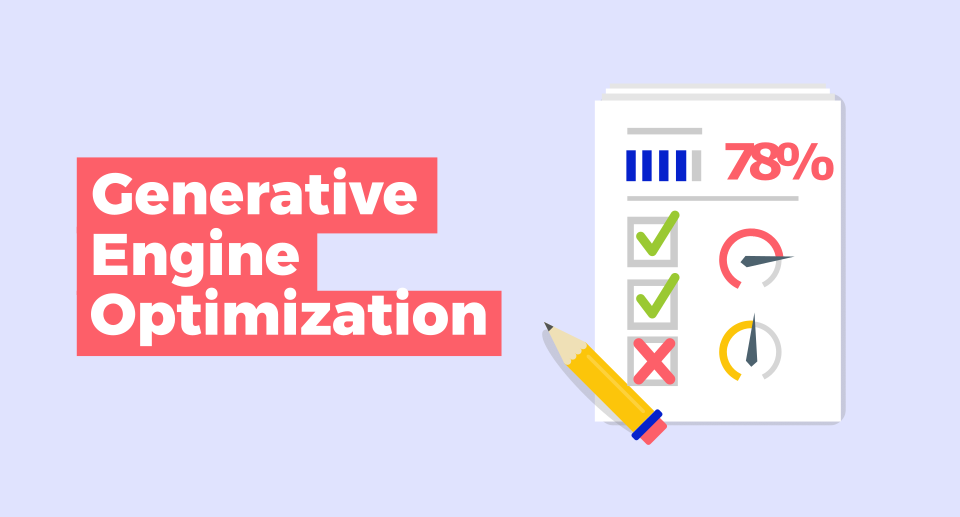
    Generative Engine Optimization (GEO) is an emerging digital marketing strategy focused on optimizing content to appear in AI-generated responses from platforms like Google’s AI Overviews (Search Generative Experience – SGE), ChatGPT, Gemini, Perplexity, and other large language models (LLMs).1

    Unlike traditional Search Engine Optimization (SEO), which primarily aims to improve website rankings in a list of search results based on keywords and backlinks, GEO focuses on aligning content with how AI-driven search engines understand context, user intent, and generate comprehensive, direct answers.2

    Here’s a breakdown of what makes GEO different and why it’s becoming crucial:

    Key aspects and differences from traditional SEO:

    • Output Focus:
      • SEO: Aims for higher rankings in a list of web page links (SERPs).
      • GEO: Aims to have your content directly cited, summarized, or featured within the AI-generated answer or overview.3
    • Content Consumption:
      • SEO: Users click through to your website to consume the full content.
      • GEO: AI models synthesize information from various sources to provide a direct answer, potentially reducing the need for users to click through to individual websites.4
    • Optimization Approach:
      • SEO: Heavily relies on keyword density, meta tags, backlinks, and technical factors to signal relevance to traditional search algorithms.5
      • GEO: Goes beyond keywords to focus on:
        • Context and User Intent: Understanding the underlying question and providing comprehensive, clear, and relevant answers.
        • Natural Language Processing (NLP): Writing content in a natural, conversational tone that AI models can easily process and understand.
        • Structured Data: Utilizing schema markup to help AI models understand the context and relationships within your content.6
        • Content Quality and Authority: Emphasizing factual accuracy, citations, statistics, and demonstrating expertise, experience, authoritativeness, and trustworthiness (E-E-A-T).7
        • Multimodal Content: AI models can integrate various content types (text, images, videos, audio) into their responses, so optimizing for these formats becomes important.8
        • Direct Answers: Crafting content that directly answers common questions related to your topic.
        • Brand Mentions: Building brand authority and ensuring your brand is recognized as a trusted source in your industry.9

    Why is GEO important?

    • Evolving Search Landscape: As AI-powered search becomes more prevalent, users are increasingly getting direct answers from generative engines, rather than a list of links.10
    • Increased Visibility: Optimizing for GEO means your brand has a higher chance of being featured in these prominent AI-generated responses, expanding your reach beyond traditional search results.11
    • Enhanced User Experience: AI-generated answers aim to be quick, relevant, and comprehensive, providing a seamless experience for users. By optimizing for GEO, your content contributes to this better user experience.12
    • Future-Proofing: Embracing GEO helps businesses adapt to the evolving digital landscape and maintain their online presence as AI technology advances.13

    In essence, GEO is about creating content that not only appeals to human readers but is also easily understood and utilized by AI models to generate informative and authoritative responses.14 It’s often seen as a supplement to traditional SEO, working in tandem to ensure maximum visibility in the new era of search.

  • What Exactly is AI Doing in Email Marketing?

    What Exactly is AI Doing in Email Marketing?

    AI is rapidly transforming email marketing from a mass-broadcast approach to a highly personalized and efficient communication channel. Here’s exactly what AI is doing in email marketing:

    1. Hyper-Personalization at Scale:
      • Dynamic Content: AI analyzes individual user data (past interactions, Browse behavior, purchase history, demographics, location, even real-time contextual information like weather) to dynamically generate and insert unique content into each email. This means different product recommendations, personalized messaging, images, and even offers for each recipient.
      • Individualized Send Times: AI learns when each subscriber is most likely to open and engage with emails. It analyzes historical data to predict optimal send times, ensuring your emails land in their inbox when they’re most receptive, regardless of time zones.
      • Customized Offers: Instead of generic discounts, AI can identify the specific products or services a subscriber is most likely to be interested in and present tailored offers, bundles, or incentives.
    2. Advanced Audience Segmentation:
      • Beyond Basic Demographics: AI goes far beyond simple age or gender segmentation. It analyzes complex datasets to group customers based on nuanced behavioral patterns (e.g., purchasing frequency, engagement levels, content preferences, time as a customer, product experience, likelihood to churn, lifetime value).
      • Predictive Segmentation: AI can predict future behaviors, such as who is likely to make a purchase, abandon a cart, or unsubscribe. This allows marketers to create proactive campaigns for specific segments.
      • Lookalike Audiences: AI can identify new prospects who share similar characteristics and behaviors with your existing high-value customers, expanding your reach to highly relevant potential subscribers.
    3. Content Generation & Optimization:
      • Subject Line & Preheader Optimization: AI uses Natural Language Processing (NLP) to analyze historical performance data and generate multiple variations of catchy, high-performing subject lines and preheaders that are most likely to increase open rates. It can also suggest tweaks to existing ones.
      • Email Body Copywriting: Generative AI can assist in drafting compelling email copy, from awareness campaigns to product launches and transactional emails. While human oversight is crucial for brand voice and accuracy, AI speeds up the content creation process significantly.
      • Image and Video Suggestions: AI can recommend or even generate relevant images and videos to include in emails based on content and recipient preferences, further enhancing engagement.
      • Call-to-Action (CTA) Improvement: AI can test and refine the wording, placement, and design of CTAs to maximize click-through and conversion rates.
    4. Automated Campaign Management & Optimization:
      • A/B Testing on Steroids: AI automates the A/B testing process, running multiple variations of emails simultaneously, analyzing results in real-time, and automatically applying the winning elements to ongoing campaigns. This leads to continuous improvement without constant manual intervention.
      • Workflow Optimization: AI streamlines routine and repetitive tasks like lead nurturing sequences, abandoned cart reminders, welcome series, and re-engagement campaigns. It can trigger emails based on specific user actions or inactions.
      • Email Deliverability Improvement: AI helps monitor sender reputation, identify invalid or inactive email addresses, and optimize content to reduce the likelihood of emails landing in spam folders.
    5. Predictive Analytics & Insights:
      • Forecasting Performance: AI can predict key metrics like open rates, click-through rates, and even conversion rates for upcoming campaigns based on historical data and current trends.
      • Customer Journey Mapping: AI can analyze customer interactions across various touchpoints to map out their journey and suggest precisely timed emails that guide them from awareness to retention.
      • Identifying High-Value Customers: AI can assign lead scores and identify customers with the highest potential lifetime value, allowing for more focused marketing efforts.

    In essence, AI in email marketing helps businesses move from a “spray and pray” approach to a highly intelligent, data-driven strategy that delivers the right message to the right person at the right time, leading to significantly improved engagement, conversions, and ROI.

  • The Human Element: Why Experience Still Matters in an AI World?

    The Human Element: Why Experience Still Matters in an AI World?

    You’ve hit on a crucial point! While AI is rapidly transforming email marketing, the “human element” isn’t just still relevant – it’s becoming more valuable.

    The Human Element: Why Experience Still Matters in an AI World

    AI tools are incredible for efficiency, data analysis, and even generating first drafts.1 They can predict optimal send times, personalize subject lines, and segment audiences with remarkable precision.2 But here’s where CapStone’s 20 years of human experience truly shines:

    1. Strategic Oversight and Vision:
      • AI’s role: AI can optimize how you execute a campaign.3
      • Your role: You define why the campaign exists. Your decades of understanding market trends, consumer psychology, brand positioning, and business objectives allow you to set the strategic direction that AI then helps to achieve. You determine the “north star” that AI navigates towards.
      • Example: AI can tell you the best subject line for a product launch, but your experience tells you what product to launch and how it fits into the broader marketing strategy for the next quarter.
    2. Emotional Intelligence and Empathy:
      • AI’s limitation: AI processes data. It doesn’t feel. It can identify patterns in customer behavior, but it struggles to truly understand the nuances of human emotion, desires, and pain points.4
      • Your expertise: You’ve spent two decades observing, interacting with, and understanding real people. You know what makes them tick, what resonates emotionally, and what builds genuine trust and loyalty. This allows you to craft messages that feel authentic, relatable, and truly connect on a human level – something AI cannot yet replicate.5
      • Example: AI might suggest a re-engagement email based on inactivity. Your human insight knows to infuse that email with a sincere tone, a reminder of shared values, or a thoughtful offer that speaks to a deeper need, not just a transactional prompt.
    3. Creative Storytelling and Brand Voice:
      • AI’s capability: Generative AI can produce grammatically correct and coherent copy.6
      • Your mastery: You bring the artistry. You craft compelling narratives, inject unique brand personality, and maintain a consistent voice that resonates with your audience.7 You understand how to weave together words, imagery, and calls to action into an engaging story that builds brand affinity, not just generates clicks. AI can provide the bricks, but you build the cathedral.
      • Example: AI can write product descriptions.8 You, with your experience, craft the captivating story behind the product, highlighting its unique benefits and emotional appeal in a way that truly differentiates your brand.
    4. Bias Detection and Ethical Considerations:
      • AI’s vulnerability: AI models are trained on data, and if that data contains biases, the AI will perpetuate them.9
      • Your responsibility: Your human judgment is critical for identifying and mitigating these biases. You ensure that campaigns are inclusive, ethical, and align with societal values and your brand’s principles. This is a non-negotiable aspect that requires human oversight.
      • Example: An AI might inadvertently generate content that is insensitive to a particular demographic if its training data was skewed.10 Your experienced eye catches this immediately and corrects it.
    5. Relationship Building and Crisis Management:
      • AI’s transactional nature: AI is great for automating transactions and predictable interactions.11
      • Your relational strength: Building long-term client relationships and navigating complex marketing challenges (like a PR crisis or a major market shift) requires empathy, negotiation, and strategic thinking that only humans possess. Your 20 years mean you’ve seen it all, and you know how to adapt and lead.
      • Example: When a client faces an unexpected challenge, AI can provide data. You provide the calm, experienced guidance and creative problem-solving to navigate the situation and emerge stronger.

    The Future: A Powerful Synergy

    Ultimately, the most successful email marketing in the AI era isn’t about choosing between AI and humans; it’s about fostering a powerful collaboration.12 AI handles the heavy lifting of data processing, personalization at scale, and automation, freeing up your agency’s seasoned experts to focus on:13

    • Higher-level strategy and innovation.
    • Deepening customer relationships.
    • Crafting truly impactful and emotionally resonant content.
    • Ensuring ethical and brand-aligned communication.

    Our 20 years of experience provide the indispensable wisdom, creative spark, and strategic acumen that elevate AI’s capabilities from mere efficiency to extraordinary impact. It’s about augmenting human brilliance, not replacing it.14

  • How to design your data annotation pipeline?

    How to design your data annotation pipeline?

    Designing an effective data annotation pipeline is crucial for building high-quality machine learning models. It’s a systematic process that ensures your data is accurately labeled, consistent, and ready for training. Here’s a breakdown of how to design your data annotation pipeline:

    1. Define Your Project Goals and Requirements

    Before you start annotating, clearly understand what your machine learning model needs to achieve. This initial step will guide all subsequent decisions.

    • Objective Clarity: What problem are you trying to solve? What specific insights do you need from the data? For example, is it for object detection in self-driving cars, sentiment analysis in customer reviews, or medical image diagnosis?
    • Data Type and Volume: What kind of data are you annotating (text, images, video, audio, LiDAR, etc.)? How much data do you have, and how much do you anticipate needing? Each data type requires a different annotation approach.
    • Annotation Granularity: How detailed do your annotations need to be? Do you need broad categories, or highly specific pixel-level segmentation?
    • Quality Benchmarks: Define what constitutes “high quality” for your annotations. What level of accuracy and consistency is acceptable?
    • Budget and Timeline: Estimate the resources (time, money, personnel) required for the annotation project.

    2. Data Collection and Preparation

    The quality of your raw data directly impacts the quality of your annotations.

    • Collect Relevant Data: Gather data that accurately reflects real-world scenarios and is diverse enough to prevent bias in your model. Sources can include your own databases, public datasets, web scraping, or even synthetic data. Ensure you have the necessary permissions for data usage, especially for sensitive information.
    • Pre-process and Clean Data: Before sending data for annotation, clean it to remove errors, inconsistencies, duplicates, or irrelevant information. This might involve formatting, normalizing, or filtering the data.
    • Analyze Data: Understand the nature of your data, identify potential biases, and ensure it represents what your model needs to learn.

    3. Create Comprehensive Annotation Guidelines

    Clear and detailed guidelines are paramount for consistent and accurate annotations, especially with multiple annotators.

    • Clear Definitions: Define each label clearly with examples of correct and incorrect annotations.
    • Annotation Rules: Specify rules for handling edge cases, ambiguous scenarios, overlapping objects, and difficult instances.
    • Decision-Making Process: Outline how annotators should resolve disagreements or uncertainties.
    • Iterative Updates: Be prepared to update guidelines based on feedback from annotators and insights gained during the annotation process.

    4. Choose the Right Annotation Tools and Workflow

    Selecting the appropriate tools is crucial for efficiency and accuracy.

    • Tool Capabilities: Consider tools that support your specific data type and annotation tasks (e.g., bounding boxes, polygons, semantic segmentation, keypoints, text classification, entity recognition, transcription).
    • Automation Features: Look for tools that offer AI-powered pre-labeling, active learning, or other automation features to speed up the process and reduce manual effort.
    • Collaboration Features: If you have multiple annotators, choose tools that facilitate collaboration, task assignment, and progress tracking.
    • Integration: Ensure the tool can integrate with your existing ML pipeline and data storage solutions.
    • Open-source vs. Commercial: Evaluate open-source options like CVAT or Label Studio, or commercial platforms like Labelbox, SuperAnnotate, Scale AI, or Encord, based on your budget, security needs, and required features.
    • Workflow Design:
      • Manual Annotation: For complex or nuanced tasks that require human judgment.
      • Machine-Assisted Labeling: Using pre-trained models to auto-label data, with humans reviewing and correcting. This significantly speeds up the process.
      • Active Learning: Iteratively training a model on a small annotated dataset, then using the model to identify the most informative unlabeled data points for human annotation, thus minimizing the overall labeling effort.

    5. Workforce Management (In-house vs. Outsourced)

    Decide who will be doing the annotation and how they will be managed.

    • In-house Team: Offers high control and domain expertise, but requires significant investment in hiring, training, and management.
    • Outsourced Team/Crowdsourcing: Provides scalability and can be cost-effective for large volumes, but requires robust quality control mechanisms and clear communication.
    • Training and Onboarding: Regardless of your choice, provide thorough training sessions, practice tasks, and continuous feedback to annotators. Ensure they are proficient with the tools and guidelines.
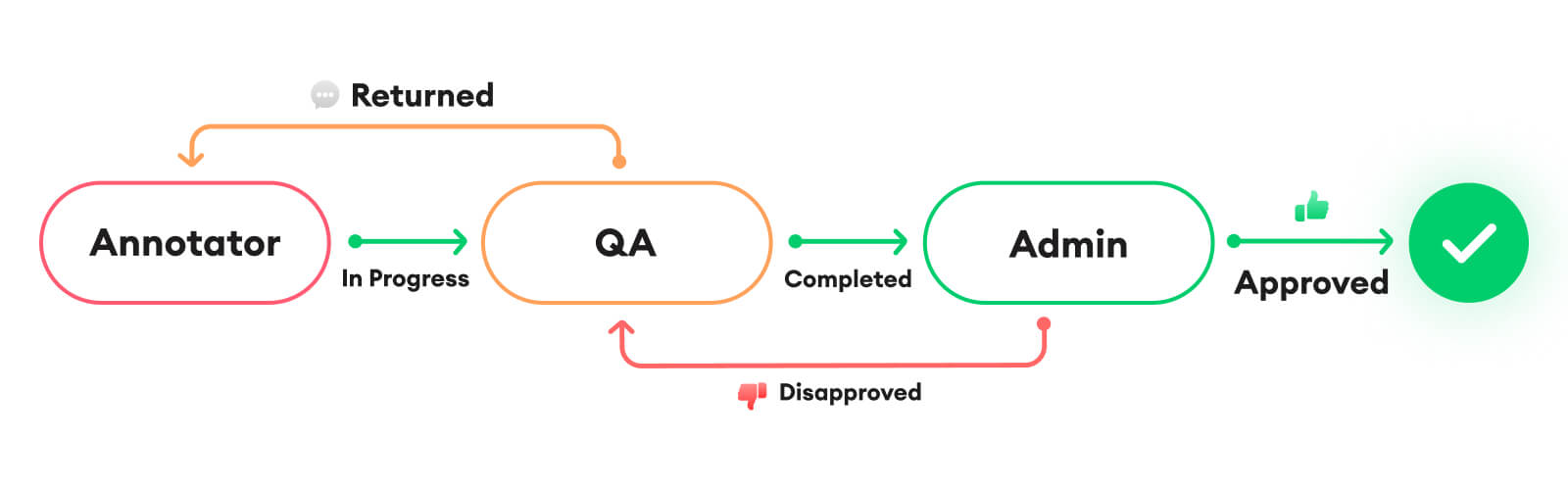
    • Team Structure: Assign roles such as annotators, quality reviewers, and project leads.

    6. Implement Robust Quality Control and Validation

    Maintaining high annotation quality is critical for model performance.

    • Inter-Annotator Agreement (IAA): Have multiple annotators label the same subset of data and measure their agreement (e.g., using metrics like Cohen’s Kappa or Fleiss’ Kappa). Low IAA indicates ambiguous guidelines or annotator issues.
    • Sample Checks/Audits: Regularly review a subset of annotated data to identify errors or inconsistencies.
    • Consensus Techniques: For disagreements, implement a system for reaching consensus, such as expert review, voting, or group discussions.
    • Automated Quality Checks: Use scripts or built-in tool features to flag potential errors, outliers, or inconsistencies.
    • Feedback Loops: Establish a continuous feedback loop between annotators, quality reviewers, and project managers to address issues, clarify guidelines, and improve the process.
    • Error Analysis: Analyze the types of errors being made to refine guidelines or provide additional training.

    7. Iterate and Refine

    Data annotation is rarely a one-off process. It’s iterative and evolves with your project.

    • Monitor Performance: Track key metrics like annotation speed, cost per label, quality scores, and annotator productivity.
    • Model Evaluation and Feedback: Use the annotated data to train your ML model. Analyze model performance and identify areas where more or better annotation is needed. This feedback should inform updates to your dataset and annotation process.
    • Version Control: Maintain records of all versions of your data, annotations, and quality checks.
    • Adapt to New Data: As your project progresses and new data comes in, be prepared to adapt your annotation process and guidelines.

    By systematically addressing each of these stages, you can design a data annotation pipeline that consistently delivers high-quality, reliable training data for your machine learning initiatives.

  • Email sequence for a startup SAAS company

    Email sequence for a startup SAAS company

    For a startup SaaS company, an effective email sequence is crucial for nurturing leads, onboarding users, driving product adoption, and retaining customers. Here’s a suggested sequence, broken down by stages of the customer journey, along with best practices:

    Key Principles for all SaaS Email Sequences:

    • Personalization: Address users by name and tailor content based on their behavior, role, industry, and product usage.
    • Segmentation: Group users based on their lifecycle stage (lead, trial user, paying customer, churn risk), feature usage, engagement level, etc.
    • Clear Call-to-Actions (CTAs): Each email should have a single, clear, and compelling CTA.
    • Value-Driven Content: Focus on how your product solves their problems and provides benefits. Avoid jargon.
    • Conciseness: Keep emails short, to the point, and easy to digest.
    • Mobile-Friendly Design: Ensure your emails look good and are readable on all devices.
    • Branding: Maintain a consistent brand voice and visual identity.
    • A/B Testing: Continuously test subject lines, content, CTAs, and sending times to optimize performance.
    • Analytics: Track open rates, click-through rates, conversion rates, and unsubscribe rates to measure success and identify areas for improvement.1

    I. Lead Nurturing Sequence (Pre-Signup)

    Goal: Educate potential leads about your solution, build trust, and encourage them to sign up for a free trial or demo.

    • Email 1: Welcome & Value Proposition
      • Trigger: Lead signs up for a newsletter, downloads a lead magnet (e.g., ebook, whitepaper), or attends a webinar.
      • Subject Line: Welcome to [Your Company]! Here’s your [Lead Magnet/What to Expect]
      • Content:
        • Thank them for their interest.
        • Deliver the promised lead magnet or briefly introduce your company and its core value proposition (what problem do you solve?).
        • Set expectations for future emails (e.g., “In the coming weeks, we’ll share tips on X, Y, Z”).
        • CTA: Access [Lead Magnet] / Learn more about [Your Product].
    • Email 2: Problem & Solution
      • Trigger: 2-3 days after Email 1.
      • Subject Line: Are you struggling with [Problem]? We can help.
      • Content:
        • Empathize with a common pain point your target audience faces.
        • Briefly explain how your SaaS product addresses this specific problem.
        • Share a relevant blog post, case study, or success story.
        • CTA: See how [Your Product] solves [Problem] / Read our success story.
    • Email 3: Feature Highlight / Use Case
      • Trigger: 3-4 days after Email 2.
      • Subject Line: Unlock [Specific Benefit] with [Your Product Feature]
      • Content:
        • Focus on one key feature or a specific use case of your product.
        • Explain its benefits in simple terms.
        • Include a short video demo or screenshot if possible.
        • CTA: Explore [Feature Name] / Try [Your Product] for Free.
    • Email 4: Social Proof / Testimonial
      • Trigger: 3-4 days after Email 3.
      • Subject Line: Don’t just take our word for it: See what [Customer Name] says!
      • Content:
        • Share a compelling customer testimonial or a snippet from a case study.
        • Highlight quantifiable results if available.
        • CTA: Read more customer stories / Start your free trial.
    • Email 5: Soft Sales Pitch / Demo Invitation
      • Trigger: 2-3 days after Email 4.
      • Subject Line: Ready to experience the power of [Your Product]?
      • Content:
        • Recap the main benefits.
        • Address common objections or questions subtly.
        • Offer a clear path to conversion.
        • CTA: Start your free trial / Schedule a demo.

    II. Onboarding Sequence (Post-Signup/Free Trial)

    Goal: Help new users quickly achieve their “Aha! moment,” understand the product’s core value, and become active users. This sequence is often triggered by user actions.

    • Email 1: Warm Welcome & First Steps
      • Trigger: Immediately after signup (free trial or paid).
      • Subject Line: Welcome to [Your Product Name], [User Name]! Here’s how to get started.
      • Content:
        • Enthusiastic welcome and thank you.
        • Login link.
        • One to three clear, easy “first steps” or a quick-start guide.
        • Brief overview of what to expect in the trial/onboarding.
        • CTA: Log in to your account / Complete your profile.
    • Email 2: Highlight a Key Feature & Its Benefit
      • Trigger: 1-2 days after Email 1, or if a specific activation milestone hasn’t been met.
      • Subject Line: Achieve [Specific Goal] with [Feature Name] in [Your Product]
      • Content:
        • Focus on one core feature that delivers immediate value.
        • Explain how to use it and why it’s beneficial for them.
        • Include a short tutorial video or link to a relevant help article.
        • CTA: Try [Feature Name] now / Watch the tutorial.
    • Email 3: Advanced Tip / Workflow Optimization
      • Trigger: 2-3 days after Email 2, or if they’ve engaged with the previous feature.
      • Subject Line: Supercharge your [Task] with this [Your Product] tip!
      • Content:
        • Introduce a slightly more advanced feature or a common workflow.
        • Show how it can save time, improve efficiency, etc.
        • Link to relevant resources (knowledge base, community forum).
        • CTA: Learn more about advanced features / Discover more tips.
    • Email 4: Proactive Support / Q&A
      • Trigger: Mid-trial (e.g., day 5 of a 14-day trial) or if usage drops.
      • Subject Line: Need a hand, [User Name]? We’re here to help!
      • Content:
        • Offer assistance and remind them of support channels.
        • Anticipate common questions and provide links to FAQs.
        • Encourage them to reach out.
        • CTA: Contact Support / Visit our Help Center.
    • Email 5: Trial Expiration Reminder (if applicable)
      • Trigger: 2-3 days before trial ends.
      • Subject Line: Your [Your Product] trial ends soon!
      • Content:
        • Politely remind them of the remaining trial time.
        • Reiterate the benefits they’ve experienced or can still achieve.
        • Clearly explain how to upgrade.
        • CTA: Upgrade now / See our pricing plans.
    • Email 6: Final Trial Expiration / Offer (if applicable)
      • Trigger: On the day trial ends.
      • Subject Line: Last chance: Extend your [Your Product] trial!
      • Content:
        • Urgency-driven message.
        • Consider a small incentive (e.g., “extend trial for 7 days,” “10% off your first month”).
        • CTA: Extend my trial / Upgrade to a paid plan.

    III. Customer Engagement & Retention Sequence (Post-Conversion)

    Goal: Keep paying customers engaged, informed about new features, and prevent churn.

    • Email 1: Welcome to the [Your Product] Family!
      • Trigger: Immediately after conversion to a paid plan.
      • Subject Line: Welcome to the [Your Product] family, [User Name]!
      • Content:
        • Congratulate them on becoming a paid customer.
        • Reassure them of their decision.
        • Provide information on how to access their account, billing details, and key support channels.
        • CTA: Access your account / Manage your subscription.
    • Email 2: Deep Dive into Advanced Features
      • Trigger: 1-2 weeks after conversion, or based on product usage.
      • Subject Line: Unlock even more power with [Advanced Feature]
      • Content:
        • Showcase features that can help them maximize value.
        • Link to webinars, advanced tutorials, or use-case specific guides.
        • CTA: Explore [Advanced Feature] / Join our next webinar.
    • Email 3: Product Updates & New Features
      • Trigger: Whenever new features or significant updates are released.
      • Subject Line: Exciting news! Introducing [New Feature Name]
      • Content:
        • Announce new features with clear benefits.
        • Provide a quick demo or link to a detailed explanation.
        • CTA: Try out the new [Feature] / Read the release notes.
    • Email 4: Success Stories & Best Practices
      • Trigger: Monthly/bi-monthly, or based on user inactivity.
      • Subject Line: See how [Customer Name] is achieving [Goal] with [Your Product]
      • Content:
        • Share inspiring success stories or use cases.
        • Provide actionable best practices to help them get more from the product.
        • CTA: Read the case study / Discover more best practices.
    • Email 5: Feedback Request / NPS Survey
      • Trigger: Quarterly or after a significant usage milestone.
      • Subject Line: We’d love your feedback on [Your Product]
      • Content:
        • Politely ask for their feedback on their experience.
        • Explain how their input helps improve the product.
        • CTA: Take our quick survey / Give us your feedback.
    • Email 6: Renewal Reminders (if applicable)
      • Trigger: 30 days, 7 days, and 1 day before subscription renewal.
      • Subject Line: Your [Your Product] subscription is renewing soon!
      • Content:
        • Remind them of the upcoming renewal date and cost.
        • Reiterate the value they’ve received from your product.
        • Provide clear instructions for managing their subscription.
        • CTA: Manage your subscription / Review your plan.

    IV. Churn Prevention & Win-back Sequence

    Goal: Re-engage inactive users or attempt to win back churned customers.

    • Email 1: We Miss You! (Re-engagement)
      • Trigger: User hasn’t logged in or used the product for a specific period (e.g., 15-30 days).
      • Subject Line: We miss you, [User Name]!
      • Content:
        • Acknowledge their inactivity.
        • Remind them of the value they’re missing out on.
        • Highlight a key feature or new update they might find useful.
        • CTA: Log back in / See what’s new.
    • Email 2: Personalized Help / Offer
      • Trigger: A few days after Email 1 if no engagement.
      • Subject Line: How can we help you get back on track?
      • Content:
        • Offer personalized assistance (e.g., a quick call with a success manager).
        • Consider a small incentive to re-activate (e.g., “free month,” “discount”).
        • CTA: Schedule a call / Claim your offer.
    • Email 3: Feedback on Inactivity (if churned or trial ended)
      • Trigger: User has churned or trial ended without conversion.
      • Subject Line: Quick question about your [Your Product] experience…
      • Content:
        • Politely ask why they left or didn’t convert.
        • Use this feedback to improve your product or processes.
        • CTA: Share your feedback / Tell us what happened.
    • Email 4: Win-Back Offer (for churned users)
      • Trigger: 30-60 days after churn, based on feedback.
      • Subject Line: Come back to [Your Product]! Special offer inside.
      • Content:
        • Highlight improvements made since they left.
        • Offer a compelling discount or extended trial period.
        • CTA: Reactivate your account / Get started again.

    Important Considerations for Startups:

    • Start Simple: Don’t try to implement every sequence at once. Prioritize the lead nurturing and onboarding sequences first.
    • Automate: Use an email marketing automation platform (e.g., HubSpot, Mailchimp, ActiveCampaign, SendGrid) to set up these sequences and triggers.
    • Test and Iterate: Your initial sequences won’t be perfect. Continuously monitor your metrics and make adjustments based on what’s working and what’s not.
    • Human Touch: Where appropriate, add a personal signature from a founder or customer success rep to make emails feel less automated.
    • Don’t Overwhelm: Be mindful of email frequency. Avoid sending too many emails too quickly, which can lead to unsubscribes.

    By implementing these well-structured email sequences, your SaaS startup can effectively guide prospects through the funnel, ensure successful onboarding, and foster long-term customer relationships.

  • Why annotation is the hidden backbone of machine learning?

    Why annotation is the hidden backbone of machine learning?

    Annotation is often called the “hidden backbone” of machine learning because it’s a fundamental and indispensable step, particularly for supervised learning, yet its critical role is often overlooked or underestimated.1 Here’s why it’s so vital:

    1. Fueling Supervised Learning:

    • Learning by Example: Most powerful machine learning models today, especially in areas like computer vision and natural language processing, rely on supervised learning. This means they learn by being shown countless examples of data paired with the correct “answer” or label.2
    • Ground Truth: Annotated data provides this “ground truth.”3 For instance, in image recognition, an image of a cat needs to be explicitly labeled as “cat” for the model to learn what a cat looks like.4 Without these labels, the model has no reference point to learn from.
    • Pattern Recognition: The machine learning algorithm identifies patterns and relationships between the raw input data and its associated labels.5 This allows it to generalize and make predictions on new, unseen data.

    2. Enhancing Model Accuracy and Performance:

    • Quality In, Quality Out: The performance of any machine learning model is directly tied to the quality of the data it’s trained on. High-quality, accurately annotated data leads to more precise, reliable, and robust models.6
    • Reduced Errors and Bias: Poorly or inconsistently annotated data can introduce errors and biases into the model, leading to inaccurate predictions or even discriminatory outcomes.7 Meticulous annotation helps mitigate these issues.8
    • Generalization: Well-annotated data helps models learn to generalize from the training data to real-world scenarios, making them more effective in diverse situations.9

    3. Enabling Complex AI Applications:

    • Understanding Nuance: Raw, unstructured data (like images, audio, video, or free-form text) lacks the inherent context for machines to understand. Annotation adds this context, allowing AI systems to interpret and process diverse data types for complex applications.10
    • Examples Across Industries:
      • Self-driving cars: Annotated video data (labeling roads, traffic signs, pedestrians, other vehicles) allows cars to “see” and react to their environment.11
      • Medical diagnosis: Annotated medical images (X-rays, MRIs) help models detect diseases.12
      • Natural Language Processing (NLP): Annotated text data (sentiment analysis, named entity recognition, intent detection) powers chatbots, translation services, and content moderation.13
      • Personalized recommendations: Labeled user behavior data helps recommendation systems suggest relevant products or content.14

    4. Model Validation and Improvement:

    • Annotated data isn’t just for training; it’s also crucial for evaluating and refining models.15 By comparing the model’s predictions against the annotated “correct” answers, developers can identify areas for improvement and iteratively enhance the model’s performance.

    Challenges in Annotation:

    Despite its importance, data annotation is a complex and often challenging process:

    • Scale and Volume: Modern AI models require vast amounts of data, making annotation a time-consuming and resource-intensive task.16
    • Consistency and Subjectivity: Ensuring consistent labeling across large teams of annotators, especially for subjective tasks (e.g., sentiment analysis), is a significant challenge.17
    • Cost and Expertise: Manual annotation can be expensive and requires skilled annotators who understand the domain.18
    • Data Quality and Bias: Raw data can be noisy, incomplete, or biased, which can directly impact the quality of annotations and subsequently the model’s performance.

    In essence, while the complex algorithms and powerful hardware of machine learning often get the spotlight, it’s the painstaking, human-driven process of data annotation that provides the structured, understandable information these algorithms need to learn and operate effectively. It’s the silent, foundational work that truly unlocks the potential of AI.

  • How to compete with AI in email marketing?

    How to compete with AI in email marketing?

    Competing with AI in email marketing isn’t about beating AI, but rather about leveraging it and emphasizing the unique human strengths that AI cannot replicate. AI is a powerful assistant, not a replacement for human creativity and empathy.1

    Here’s how to compete and thrive with AI in email marketing:

    1. Embrace AI as a Strategic Partner, Not a Competitor:

    • Automate Tedious Tasks: Let AI handle tasks like:
      • Subject Line Optimization: AI can analyze past performance and suggest subject lines with higher open rates.2
      • Send Time Optimization: AI can predict the best time to send emails to individual recipients based on their past engagement.3
      • Audience Segmentation: AI can analyze vast amounts of data to create highly nuanced and dynamic customer segments.4
      • A/B Testing: AI can streamline the process of testing multiple email variations, accelerating optimization.5
      • Basic Content Generation: AI can generate initial drafts for welcome emails, transactional emails, or even product descriptions, freeing up your time.6
      • Data Analysis & Reporting: AI can quickly process campaign data and provide insights that would take humans hours to compile.7
    • Hyper-Personalization at Scale: AI excels at processing data to deliver extremely personalized content.8 Use it to:
      • Tailor product recommendations: Based on Browse history and past purchases.9
      • Customize content: Dynamically adjust content blocks based on user preferences and behavior.10
      • Predict customer lifetime value: To focus efforts on high-value subscribers.

    2. Lean into the “Human Touch” – What AI Cannot Replicate:

    • Authentic Brand Voice & Storytelling: AI can mimic, but it struggles with genuine emotion, humor, and truly unique brand storytelling.11 Your distinct brand voice and narrative will resonate more deeply with your audience.
    • Empathy and Emotional Intelligence: For sensitive topics, customer service interactions, or building genuine rapport, human empathy is irreplaceable.12
    • Strategic Creativity & Innovation: While AI can generate ideas, true creative breakthroughs, unconventional campaigns, and out-of-the-box thinking still require human ingenuity.13
    • Relationship Building: Email marketing isn’t just about sales; it’s about building long-term relationships.14 Humans excel at fostering trust, loyalty, and community.15
    • Understanding Nuance and Context: AI might miss subtle cues or misunderstand complex human emotions.16 Human marketers can interpret situations and provide personalized responses that an AI might not grasp.
    • Ethical Oversight and Bias Correction: AI models can inherit biases from their training data.17 Human marketers are crucial for monitoring AI outputs, ensuring ethical practices, and preventing discriminatory or inappropriate content.18
    • Handling Unexpected Situations: When a crisis arises, or an unusual customer query comes in, human judgment and adaptability are essential.19 AI operates within predefined parameters.20

    3. Focus on High-Value Activities:

    • Strategy and Planning: With AI handling repetitive tasks, you can dedicate more time to developing overarching email marketing strategies, identifying new opportunities, and aligning email efforts with broader business goals.21
    • Creative Direction and Refinement: Focus on crafting compelling narratives, designing visually appealing emails, and ensuring the “human touch” is present in every message, even those initially drafted by AI.22
    • Relationship Management: Spend time nurturing relationships with key subscribers, engaging with feedback, and building a community around your brand.23
    • Staying Ahead of Trends: Continuously monitor industry trends, competitor activities, and new technologies to ensure your email marketing remains cutting-edge.

    4. Ethical Considerations:

    • Data Privacy and Consent: Always prioritize user privacy and ensure clear consent for data collection and usage.24 Be transparent about how AI is being used in your email marketing.
    • Algorithmic Bias: Be aware of potential biases in AI algorithms and actively work to mitigate them by ensuring diverse and representative training data (if you’re involved in AI development) or by scrutinizing AI-generated content for fairness.25
    • Transparency: Disclose when AI is being used to generate content or personalize messages, especially if it’s not immediately obvious.26 Building trust with your audience is paramount.

    In conclusion, the future of email marketing isn’t about AI replacing humans, but rather about a powerful synergy. By understanding AI’s strengths and weaknesses, you can leverage it for efficiency and scale, while simultaneously amplifying the unique human qualities that foster genuine connection and brand loyalty.

  • The Zero Click Internet

    The Zero Click Internet

    The Web is Undergoing Its Biggest Change Yet

    The internet is in the midst of undergoing the biggest change since its inception. It’s huge. And there is no going back.

    The web is changing into the Zero Click Internet, and it will change everything about how you do everything. Zero Click Internet means you’ll no longer click on links to find the content you want. In fact, much of the internet already works this way.

    SOURCE and to READ more at: https://www.techspot.com/article/2908-the-zero-click-internet/