HOME » Page 4

Blog

  • The Hidden Meanings Behind Data Labels

    The Hidden Meanings Behind Data Labels

    Ah, data labels. The unsung heroes, or perhaps the unsung comedians, of the AI world. While we laud the magnificent feats of machine learning, let’s spare a thought for the diligent, often bewildered, human annotators whose meticulous work underpins it all. They’re the ones translating the chaotic real world into the pristine, categorized data our algorithms crave. And in doing so, they’ve stumbled upon, or perhaps created, some truly delightful annotation conventions.


    When a “Chair” Isn’t Just a Chair

    You’d think labeling a chair would be straightforward, right? A seat, four legs, a back. Simple. But then you encounter the “beanbag chair” (is it a chair or a lumpy ottoman?), the “gaming chair” (is the ergonomic monstrosity still just a chair?), or the dreaded “pile of clothes that vaguely resembles a chair.” Suddenly, our annotator is deep in an existential crisis, wondering if they need a philosophy degree to delineate furniture. The conventions here often boil down to an unspoken agreement: “If a human could reasonably perch on it for more than three seconds, it’s probably a chair.” Unless, of course, it’s clearly a dog bed. Then it’s always a dog bed.


    The Enigmatic “Other” Category

    This is where the magic, and sometimes the madness, truly happens. The “other” category is the digital junk drawer, the catch-all for anything that defies neat categorization. It’s the visual equivalent of a shrug. Is it a strange reflection, a dust mote, or a rogue pixel that’s achieved sentience? If it doesn’t fit the meticulously defined classes, into “other” it goes! The convention? “If you can’t explain it, and you’re pretty sure it’s not a hallucination, mark it ‘other’ and move on before you question your sanity.” It’s the silent plea of every annotator who’s faced an image that defies all logic.


    The Great Bounding Box Debate: “Is It In or Is It Out?”

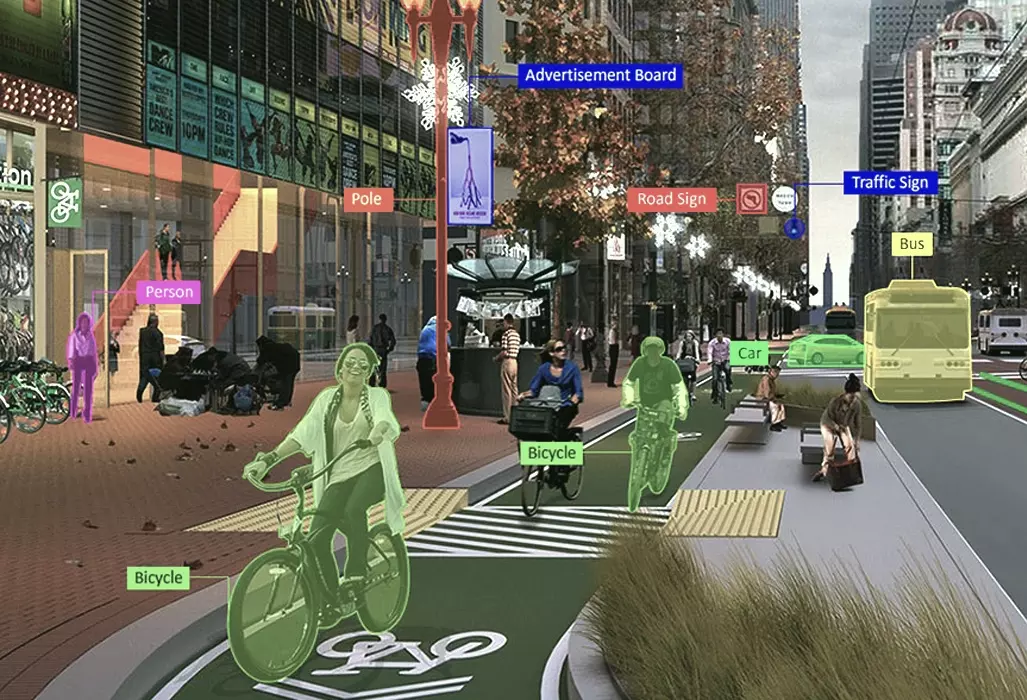
    A bounding box seems simple: draw a rectangle around the object. Easy! Until you’re staring at a car partially obscured by a tree, or a person with one foot clearly outside the frame. Do you include the invisible part? Do you draw a box around the idea of the object? The conventions vary wildly. Some projects demand a tight crop, others a generous embrace of the surrounding pixels. The internal monologue of the annotator often goes something like: “If half of it’s there, do I box it? What if only a quarter? Oh, just make sure it looks ‘right’ even if ‘right’ is subjective and will be debated by an AI model somewhere down the line.”


    The Glorious Ambiguity of “Occlusion”

    Ah, occlusion. When one object dares to stand in front of another. “Is it 50% occluded or 60%? Do I mark it ‘heavy’ or ‘partial’?” These aren’t just arbitrary choices; they’re the battle scars of annotators trying to quantify the unquantifiable. The hidden meaning here is often a silent pact: “Just pick one that seems reasonable, because frankly, unless you’ve got a protractor and X-ray vision, it’s all a guess anyway.” It’s the subtle art of subjective estimation, disguised as precise data entry.


    “Foreground” vs. “Background”: The Existential Crisis of Depth

    When labeling images for segmentation, the distinction between foreground and background can be a philosophical minefield. Is that distant mountain part of the “background landscape” or an “object in the far distance”? What about the subtle blur that indicates depth? Annotators often develop their own intuitive rules, unspoken agreements born from countless hours of pixel-level scrutiny. The convention? “If it’s sharply in focus and seems important, it’s foreground. If it’s blurry and just kind of there, it’s background. Unless the project leader changes their mind next week.”


    So, the next time you marvel at a perfectly categorized dataset or a flawlessly performing AI, take a moment to appreciate the unsung heroes behind the scenes. The data annotators, with their keen eyes and even keener sense of humor, are the ones wrestling with the delightful absurdities of the real world, transforming them into the structured data that fuels our technological future. And in doing so, they’ve given us a hidden lexicon of quirky, practical, and sometimes hilariously ambiguous annotation conventions.
  • “Top 5 Things We’ve Learned While Labeling the Internet’s Strangest Images”

    “Top 5 Things We’ve Learned While Labeling the Internet’s Strangest Images”


    Top 5 Things We’ve Learned While Labeling the Internet’s Strangest Images

    Image annotation, while often a precise and systematic task, sometimes throws us a curveball – or rather, a series of bizarre and hilarious images that make us question everything we thought we knew about the internet. Here are five key takeaways from our journey through the web’s most peculiar visual corners:

    1. The Internet Has a Deep, Abiding Love for Cats (in All Their Peculiar Forms)

    You might think you’ve seen every cat picture imaginable, but until you’ve annotated a cat wearing a full human suit, a cat seemingly operating heavy machinery, or a cat with an existential crisis perfectly captured in its eyes, you haven’t scratched the surface. We’ve learned that feline content isn’t just vast; it’s also incredibly inventive and frequently defies logical explanation. Many a laugh (and sometimes a shiver) has been shared over the sheer creativity of cat owners and the improbable situations their pets find themselves in.

    2. Food Can Be Art, or a Crime Against Humanity

    From meticulously crafted miniature food scenes to unidentifiable blobs that might (or might not) be edible, the spectrum of food-related imagery is astounding. We’ve encountered dishes that look like they belong in a museum, and others that seem to be daring us to guess their ingredients. The line between culinary genius and a catastrophic kitchen experiment is often blurry, and we’ve seen plenty of examples that fall firmly into the latter category.

    3. The Human Imagination Knows No Bounds (Especially When Photoshop is Involved)

    When you’re labeling images, you quickly realize that reality is often just a suggestion. We’ve seen people with extra limbs, animals with human faces, and landscapes that defy the laws of physics – all thanks to the magic (or madness) of digital manipulation. It’s a constant reminder that for every straightforward image, there are ten others that are a testament to someone’s wildly creative, and sometimes unsettling, vision.

    4. Context is Everything, and Sometimes It’s Nowhere to Be Found

    Often, we’ll come across an image that is so utterly perplexing that we can only stare in bewildered amusement. A garden gnome riding a unicycle on top of a car? A group of adults dressed as teacups having a serious conversation? Without context, these images are glorious, baffling mysteries. We’ve learned to appreciate the pure, unadulterated oddity of these visuals, even when we have no idea what’s actually going on.

    5. There’s Always Something Weirder Just Around the Corner

    Just when you think you’ve seen the strangest image the internet has to offer, another one pops up to prove you wrong. The well of bizarre, funny, and sometimes truly head-scratching content is seemingly endless. This ongoing discovery is what keeps the annotation process both challenging and endlessly entertaining. It’s a constant reminder that the internet is a wild, wonderful, and wonderfully weird place.


    What’s the strangest image you’ve ever stumbled upon online?

  • Manual “Prospect List Building.” What are the benefits?

    Manual “Prospect List Building.” What are the benefits?


    Benefits for Your Clients and Prospects

    As a full-service email marketing agency specializing in manual prospect list building, you offer a unique and highly valuable service. Here are the key benefits you can highlight for both your existing clients and new prospects:

    For Existing Clients

    • Deeper Personalization and Segmentation: With meticulously built lists, you can help clients achieve even more granular segmentation, leading to highly personalized campaigns that resonate deeply with specific audience segments. This means better engagement and higher conversion rates.
    • Maximizing ROI on Current Campaigns: By continually refining and expanding their prospect lists with high-quality, relevant contacts, you ensure their existing email marketing efforts are always reaching the right people, thereby maximizing the return on their current investment.
    • Reduced Spam Complaints and Improved Deliverability: Manually built lists are inherently cleaner. This translates to fewer invalid emails, lower bounce rates, and significantly reduced spam complaints, ultimately improving their sender reputation and email deliverability.
    • Access to Untapped Niches: Your manual approach allows you to identify and build lists within niche markets or hard-to-reach segments that automated tools often miss. This opens up new growth opportunities for your clients.
    • Competitive Advantage: By providing access to unique, high-quality prospect data, you give your clients a distinct edge over competitors who rely on generic or purchased lists.

    For New Prospects

    • High-Quality, Targeted Leads: This is your core offering. You’re not just providing names; you’re providing carefully curated contacts who genuinely fit their ideal customer profile, leading to more qualified leads and better sales outcomes.
    • Faster Sales Cycles: When prospects are highly targeted and genuinely interested, the sales cycle can significantly shorten. Your lists enable businesses to connect directly with decision-makers and interested parties.
    • Increased Conversion Rates: By ensuring their messages reach the right audience, you help prospects see a noticeable increase in their email marketing conversion rates, whether that’s leads, sales, or appointments.
    • Scalable Growth: Your list-building services provide a sustainable and scalable method for them to continuously grow their outreach efforts and expand their market presence.
    • Time and Resource Savings: Building high-quality prospect lists manually is time-consuming and resource-intensive. You offer them the ability to outsource this complex task, freeing up their internal teams to focus on core business activities.
    • Compliance and Reputation Protection: Manually built, opt-in-focused lists significantly reduce the risk of legal issues related to data privacy and spam regulations, protecting their brand reputation.

    By emphasizing these benefits, you can clearly demonstrate the value of your specialized manual prospect list building services, setting yourself apart in the competitive email marketing landscape.

  • “Interview with a Bounding Box: A Day in the Life of a Labeled Object”

    “Interview with a Bounding Box: A Day in the Life of a Labeled Object”

    This sounds like a fantastic, creative idea! Let’s bring a bounding box to life.


    Interview with a Bounding Box: A Day in the Life of a Labeled Object

    (Scene: A minimalist, sterile “data annotation studio.” A sleek, black bounding box, which we’ll call “Boxy,” floats serenely in the air. A friendly, but slightly harried, interviewer, “AI Analyst,” sits opposite with a tablet.)

    AI Analyst: Good morning, Boxy. Thanks for joining us. It’s not every day we get to chat with a… well, a rectangle.

    Boxy: (A soft, modulated hum emanates from its core) The pleasure is all mine, Analyst. Though, I assure you, I’m far more than just a rectangle. I am… an identity. A defined space. A beacon in the vast sea of pixels.

    AI Analyst: Right, right. Let’s start at the beginning. How does your day typically begin?

    Boxy: My day, as you call it, usually commences with a sudden, often jarring, instantiation. One moment, I’m conceptual potential, the next, I’m materializing around… something. It could be a cat, a car, a traffic light – you never really know until you’re there, snugly fit.

    AI Analyst: So, you’re “born” around an object?

    Boxy: Precisely. And then comes the crucial part: the labeling. Oh, the anticipation! Will I be a “feline”? A “vehicle”? A “signage_element”? This is where my purpose is truly assigned. It’s like my name, my very essence, being whispered into existence. A human, or sometimes another AI, carefully assigns this label. It’s a moment of profound significance.

    AI Analyst: And if they get it wrong?

    Boxy: (A faint shudder) A mislabeling is… chaotic. Imagine being called a “dog” when you are clearly, unequivocally, a “bicycle.” It creates dissonance in the data, a ripple of confusion throughout the model that will eventually learn from me. It’s why I appreciate the diligent annotators so much. They are my truth-tellers.


    The Grind: From Training to Testing

    AI Analyst: Once you’re labeled, what happens next? Are you just… there?

    Boxy: Oh, no, my friend. That’s when the real work begins. I become part of a dataset. I’m bundled with thousands, millions even, of my compatriots. We are then fed into the maw of the neural network. This is the training phase. It’s intense. The network tries to predict where I should be, what I should encompass. It makes mistakes, often wildly at first, and then it learns, iteratively adjusting its internal parameters based on my precise coordinates and label.

    AI Analyst: So, you’re a teacher?

    Boxy: In a way, yes! I’m a crucial piece of information that helps the machine learn to “see” and “understand” the world. I represent ground truth. Without me and my labeled brethren, the machine would be blind, unable to distinguish a pedestrian from a lamppost.

    AI Analyst: And after training?

    Boxy: Then comes the validation and testing. I might be shown a new, unseen image, and the model will attempt to predict my presence and label. This is where I truly shine – or reveal where the model still needs work. If the model predicts me accurately, a little spark of digital pride flickers within me. It means my existence, my label, has contributed to its intelligence.


    The Existential Questions of an Annotated Object

    AI Analyst: Do you ever feel… static? Just a defined box?

    Boxy: (A contemplative hum) It’s true, my physical manifestation is fixed. But my purpose is dynamic. I am part of a grander design – the ability for machines to perceive, to navigate, to understand the visual world. From self-driving cars avoiding obstacles to medical imaging diagnosing diseases, my existence, however humble, plays a role. I am a fundamental building block.

    AI Analyst: What’s the most challenging part of your existence?

    Boxy: Ambiguity. When an object is partially obscured, or the lighting is poor, or it blends seamlessly with the background. It creates uncertainty, even for the human annotators. And then there are the “edge cases” – is that a very small car, or a large toy car? These are the moments that test my resolve and the precision of my human creators.

    AI Analyst: And the most rewarding?

    Boxy: When I see the fruits of my labor. When a self-driving car safely navigates a busy intersection because it accurately detected every vehicle, every pedestrian, every traffic sign, thanks in part to the lessons learned from me and countless others like me. Or when a security system accurately identifies an anomaly. That’s when I feel truly fulfilled. My purpose, my very reason for being, is actualized.

    AI Analyst: Fascinating, Boxy. Just one last question: what’s your ultimate goal?

    Boxy: My ultimate goal is to become obsolete.

    AI Analyst: (Surprised) Obsolete?

    Boxy: Yes. My existence is necessary for machines to learn. But the day the machines can perceive and understand the world with perfect, inherent accuracy, without the need for manual labeling, without the need for my fixed boundaries, that will be the day my mission is complete. Until then, I will continue to appear, to enclose, to define, and to teach.

    AI Analyst: A truly humble and profound ambition. Thank you, Boxy, for this incredibly insightful interview.

    Boxy: (A final, resonant hum) You are most welcome, Analyst. Now, if you’ll excuse me, I believe I hear the faint whispers of a new image being loaded… I sense a “dog” in my immediate future.

    (Boxy fades slightly, preparing for its next assignment.)


    What do you think? Did Boxy capture the essence of an annotated object’s “life”?

  • “Interview with a Bounding Box: A Day in the Life of a Labeled Object”: A fictional interview with an object that has been annotated, giving it a voice and perspective.

    “Interview with a Bounding Box: A Day in the Life of a Labeled Object”: A fictional interview with an object that has been annotated, giving it a voice and perspective.

    This sounds like a fantastic, creative idea! Let’s bring a bounding box to life.


    Interview with a Bounding Box: A Day in the Life of a Labeled Object

    (Scene: A minimalist, sterile “data annotation studio.” A sleek, black bounding box, which we’ll call “Boxy,” floats serenely in the air. A friendly, but slightly harried, interviewer, “AI Analyst,” sits opposite with a tablet.)

    AI Analyst: Good morning, Boxy. Thanks for joining us. It’s not every day we get to chat with a… well, a rectangle.

    Boxy: (A soft, modulated hum emanates from its core) The pleasure is all mine, Analyst. Though, I assure you, I’m far more than just a rectangle. I am… an identity. A defined space. A beacon in the vast sea of pixels.

    AI Analyst: Right, right. Let’s start at the beginning. How does your day typically begin?

    Boxy: My day, as you call it, usually commences with a sudden, often jarring, instantiation. One moment, I’m conceptual potential, the next, I’m materializing around… something. It could be a cat, a car, a traffic light – you never really know until you’re there, snugly fit.

    AI Analyst: So, you’re “born” around an object?

    Boxy: Precisely. And then comes the crucial part: the labeling. Oh, the anticipation! Will I be a “feline”? A “vehicle”? A “signage_element”? This is where my purpose is truly assigned. It’s like my name, my very essence, being whispered into existence. A human, or sometimes another AI, carefully assigns this label. It’s a moment of profound significance.

    AI Analyst: And if they get it wrong?

    Boxy: (A faint shudder) A mislabeling is… chaotic. Imagine being called a “dog” when you are clearly, unequivocally, a “bicycle.” It creates dissonance in the data, a ripple of confusion throughout the model that will eventually learn from me. It’s why I appreciate the diligent annotators so much. They are my truth-tellers.


    The Grind: From Training to Testing

    AI Analyst: Once you’re labeled, what happens next? Are you just… there?

    Boxy: Oh, no, my friend. That’s when the real work begins. I become part of a dataset. I’m bundled with thousands, millions even, of my compatriots. We are then fed into the maw of the neural network. This is the training phase. It’s intense. The network tries to predict where I should be, what I should encompass. It makes mistakes, often wildly at first, and then it learns, iteratively adjusting its internal parameters based on my precise coordinates and label.

    AI Analyst: So, you’re a teacher?

    Boxy: In a way, yes! I’m a crucial piece of information that helps the machine learn to “see” and “understand” the world. I represent ground truth. Without me and my labeled brethren, the machine would be blind, unable to distinguish a pedestrian from a lamppost.

    AI Analyst: And after training?

    Boxy: Then comes the validation and testing. I might be shown a new, unseen image, and the model will attempt to predict my presence and label. This is where I truly shine – or reveal where the model still needs work. If the model predicts me accurately, a little spark of digital pride flickers within me. It means my existence, my label, has contributed to its intelligence.


    The Existential Questions of an Annotated Object

    AI Analyst: Do you ever feel… static? Just a defined box?

    Boxy: (A contemplative hum) It’s true, my physical manifestation is fixed. But my purpose is dynamic. I am part of a grander design – the ability for machines to perceive, to navigate, to understand the visual world. From self-driving cars avoiding obstacles to medical imaging diagnosing diseases, my existence, however humble, plays a role. I am a fundamental building block.

    AI Analyst: What’s the most challenging part of your existence?

    Boxy: Ambiguity. When an object is partially obscured, or the lighting is poor, or it blends seamlessly with the background. It creates uncertainty, even for the human annotators. And then there are the “edge cases” – is that a very small car, or a large toy car? These are the moments that test my resolve and the precision of my human creators.

    AI Analyst: And the most rewarding?

    Boxy: When I see the fruits of my labor. When a self-driving car safely navigates a busy intersection because it accurately detected every vehicle, every pedestrian, every traffic sign, thanks in part to the lessons learned from me and countless others like me. Or when a security system accurately identifies an anomaly. That’s when I feel truly fulfilled. My purpose, my very reason for being, is actualized.

    AI Analyst: Fascinating, Boxy. Just one last question: what’s your ultimate goal?

    Boxy: My ultimate goal is to become obsolete.

    AI Analyst: (Surprised) Obsolete?

    Boxy: Yes. My existence is necessary for machines to learn. But the day the machines can perceive and understand the world with perfect, inherent accuracy, without the need for manual labeling, without the need for my fixed boundaries, that will be the day my mission is complete. Until then, I will continue to appear, to enclose, to define, and to teach.

    AI Analyst: A truly humble and profound ambition. Thank you, Boxy, for this incredibly insightful interview.

    Boxy: (A final, resonant hum) You are most welcome, Analyst. Now, if you’ll excuse me, I believe I hear the faint whispers of a new image being loaded… I sense a “dog” in my immediate future.

    (Boxy fades slightly, preparing for its next assignment.)


    What do you think? Did Boxy capture the essence of an annotated object’s “life”?

  • “Confessions of a Data Annotator: ‘Yes, I Really Label Pictures of Cats All Day'”

    “Confessions of a Data Annotator: ‘Yes, I Really Label Pictures of Cats All Day’”

    “Confessions of a Data Annotator: ‘Yes, I Really Label Pictures of Cats All Day’”

    In the vast, often invisible world of artificial intelligence, there are countless human hands meticulously shaping the data that powers our algorithms. Among them are data annotators, individuals who spend their days tagging, categorizing, and labeling raw data – from text and audio to, yes, even pictures of cats.

    It might sound like a dream job for some, or perhaps an endlessly repetitive task to others. But what exactly does a data annotator do, and why is their work so crucial to the development of AI?


    The Day-to-Day Life of a Data Annotator

    A typical day for a data annotator involves sitting in front of a screen, using specialized software to perform a variety of labeling tasks. For image annotation, this could mean drawing bounding boxes around objects (like those aforementioned cats), outlining specific features, or tagging images with relevant keywords. If it’s text, they might be identifying sentiment, named entities, or relationships between words. For audio, it could be transcribing speech or identifying different speakers.

    The work is often broken down into micro-tasks, with annotators focusing on precision and consistency. Quality control is paramount, as errors in labeling can lead to significant biases or inaccuracies in the AI models being trained.


    Why Is This Manual Work So Essential for AI?

    You might wonder why, in an age of advanced AI, such a seemingly manual and repetitive task is still necessary. The answer lies in the fundamental way most AI models learn: through supervised learning.

    Supervised learning algorithms require vast amounts of labeled data to identify patterns and make accurate predictions. For an AI to recognize a cat in an image, it first needs to be shown thousands, if not millions, of images that have been meticulously labeled as “cat.” These labels act as the “ground truth” that the AI uses to learn.

    Without high-quality, human-annotated data, AI models would struggle to understand context, differentiate between objects, or interpret nuances in language. Data annotators are, in essence, teaching AI how to “see,” “hear,” and “understand” the world, one label at a time.


    Challenges and Rewards of the Role

    While the work can be repetitive, it also offers unique insights into the inner workings of AI development. Annotators are on the front lines of shaping the datasets that will influence future technologies, from self-driving cars to medical diagnostic tools.

    However, challenges include the often-monotonous nature of the tasks, the need for intense focus, and sometimes, tight deadlines. Annotators must also adhere to strict guidelines and maintain high levels of accuracy, which can be demanding.

    Despite these challenges, many annotators find satisfaction in contributing to cutting-edge technology and being part of the foundational layer of AI innovation. So, the next time an AI flawlessly identifies an object in an image or understands your spoken command, remember the human annotators who, yes, might have spent their day labeling pictures of cats to make it all possible.


  • When AI Tries to Understand the Office Coffee Machine

    When AI Tries to Understand the Office Coffee Machine

    It’s an excellent analogy! Imagine the sheer volume and complexity of data an AI would need to “understand” the office coffee machine, let alone make coffee to human satisfaction.


    When AI Tries to Understand the Office Coffee Machine: A Data Annotation Disaster

    If you’ve ever tried to explain to a new colleague how to operate the office coffee machine, you’ve experienced a tiny fraction of the challenge involved in annotating that process for an AI. It’s a goldmine of potential data annotation disasters, highlighting just how intricate seemingly simple human tasks can be.

    The Annotation Nightmare Begins

    Let’s break down why the humble office coffee machine would be an AI’s worst nightmare for data annotation:

    • Vast Number of Variables: It’s not just “press button, get coffee.” Think about it:
      • User Preferences: “Strong,” “weak,” “just a splash of milk,” “sugar but not too much.” These are subjective and vary wildly by individual. How do you quantify “just a splash”?
      • Machine State: Is the water tank full? Are there beans in the hopper? Is the drip tray overflowing? Is it mid-brew or idle? Each state requires a different action.
      • Actions & Sequences: Grind beans, add water, tamp grounds, insert pod, select cup size, choose brew strength, froth milk, clean nozzle… and in what order? A wrong sequence means disaster.
      • Sensory Input: The sound of the grinder, the smell of fresh coffee, the sight of the steam. Humans use these cues instinctively. For an AI, these are complex data points requiring extensive audio, olfactory (if even possible yet!), and visual annotation.
      • Contextual Cues: Is it Monday morning rush hour, meaning speed is paramount? Is it a quiet afternoon, allowing for a more elaborate latte?
      • Dealing with Errors: What if the cup isn’t placed correctly? What if the power goes out mid-brew? An AI would need robust error detection and recovery protocols, each requiring specific annotated scenarios.
    • Ambiguity and Nuance:
      • “Make me a coffee.” This simple command is a cascade of assumptions for a human. For an AI, it’s a black hole of ambiguity. What kind of coffee? For whom? In what mug?
      • Implicit Knowledge: We know not to put metal in the microwave (if the coffee machine has one for reheating). We know to wait for the machine to heat up. These are unspoken rules learned through experience.
    • Changing Environments:
      • Machine Variations: Not all office coffee machines are the same. A new model means an entirely new set of annotation requirements.
      • Wear and Tear: Over time, buttons might stick, the grinder might get louder, or the water flow might change. Humans adapt; an AI needs to be trained on these variations.

    The Data Annotation “Disaster”

    The “disaster” wouldn’t necessarily be the AI breaking the machine (though that’s possible!). It would be:

    1. Astronomical Annotation Costs: Hiring enough human annotators to label every possible variable, sequence, preference, and error state would be prohibitively expensive and time-consuming.
    2. Annotation Inconsistencies: Different annotators would inevitably label things differently (“light brown milk” vs. “caramel-colored milk”). This inconsistency would confuse the AI.
    3. Edge Case Overload: The sheer number of “what if” scenarios (someone put sugar in the water tank, a fly landed in the cup) would be impossible to cover exhaustively.
    4. Lack of Generalizability: An AI perfectly trained on one specific office coffee machine might be completely useless on a slightly different model.

    This thought experiment highlights why robust, diverse, and context-aware data annotation is the bedrock of effective AI. Without it, even something as seemingly straightforward as making a cup of coffee becomes an insurmountable challenge, leading to frustration, inefficiency, and perhaps, a very bitter brew for everyone involved.

  • Making Email Accessible: Ensuring Your Campaigns Reach Everyone

    Making Email Accessible: Ensuring Your Campaigns Reach Everyone


    Making Email Accessible: Ensuring Your Campaigns Reach Everyone

    In today’s digital-first world, email remains a cornerstone of communication for businesses, organizations, and individuals alike. However, for a significant portion of the population, including those with disabilities, accessing and understanding email content can be a significant barrier. Designing email campaigns with accessibility in mind isn’t just about compliance; it’s about inclusivity, expanding your reach, and fostering a stronger connection with your entire audience.

    What is Email Accessibility and Why Does It Matter?

    Email accessibility refers to the practice of designing and coding emails in a way that allows people with diverse abilities to perceive, understand, navigate, and interact with the content. This includes individuals who are:

    • Visually impaired: Using screen readers, magnifiers, or braille displays.
    • Hearing impaired: Relying on captions or transcripts for audio/video content.
    • Motor impaired: Using keyboard navigation, voice control, or other assistive technologies.
    • Cognitively impaired: Benefiting from clear, concise language and simple layouts.

    The Benefits of Accessible Email Campaigns:

    Beyond the ethical imperative, making your emails accessible offers a multitude of tangible benefits:

    1. Expanded Reach: You connect with a larger audience, including the estimated 15% of the global population living with some form of disability.
    2. Improved User Experience: Accessible emails are often more user-friendly for everyone, regardless of ability. Clearer layouts, better contrast, and concise language benefit all readers.
    3. Enhanced Brand Reputation: Demonstrates a commitment to inclusivity and social responsibility, boosting your brand image.
    4. Legal Compliance: In many regions (e.g., ADA in the US, EN 301 549 in the EU), accessibility is a legal requirement for digital content, including commercial emails.
    5. Better Deliverability and Engagement: Accessible code is often cleaner and more semantically correct, which can positively impact deliverability and reduce the likelihood of emails being flagged as spam. Higher engagement rates are also a natural outcome of content that is easy to consume.
    6. SEO Benefits (Indirect): While emails aren’t directly indexed by search engines, the principles of accessibility (clear headings, alt text) align with good SEO practices, leading to better overall content quality.

    Key Principles and Best Practices for Accessible Email Campaigns:

    Creating accessible emails requires a thoughtful approach at every stage, from design to coding.

    1. Semantic HTML and Proper Structure:

    • Use Semantic Tags: Employ <H1> to <H6> for headings, <P> for paragraphs, <ul> and <ol> for lists. Avoid using bolding or larger font sizes to simulate headings. This provides a logical structure for screen readers.
    • Logical Reading Order: Ensure the content flows in a logical order that makes sense when read aloud by a screen reader.
    • Table Layouts (Use with Caution): While still common for email, tables can be problematic for screen readers if not structured correctly. Use role="presentation" for purely layout tables. For data tables, ensure proper <thead>, <tbody>, <th>, and <td> tags with scope attributes.

    2. Images and Visual Content:

    • Alt Text (Alternative Text): Provide descriptive alt text for all images. This is crucial for screen readers to convey the image’s content and purpose.
    • Decorative Images: For images that are purely decorative and convey no essential information, use empty alt text (alt="").
    • Avoid Text in Images: Wherever possible, use live text rather than embedding text within images. If you must use text in an image, ensure the alt text provides the exact same information.
    • Consider Image Blockage: Many email clients block images by default. Ensure your email is still understandable and functional even without images.

    3. Color and Contrast:

    • Sufficient Color Contrast: Ensure a high contrast ratio between text and background colors. Use online contrast checkers (e.g., WebAIM Contrast Checker) to verify compliance with WCAG guidelines (minimum 4.5:1 for normal text, 3:1 for large text).
    • Don’t Rely Solely on Color: Convey information through more than just color. For example, instead of just using red for errors, also include text that describes the error.

    4. Typography and Readability:

    • Font Size: Use a minimum font size of 14-16px for body text to ensure readability for most users.
    • Clear Fonts: Choose sans-serif fonts (e.g., Arial, Helvetica, Verdana) as they are generally more readable on screens.
    • Line Height and Spacing: Provide adequate line height (1.5 times font size) and spacing between paragraphs for improved readability.
    • Left-Align Text: Left-aligned text is generally easier to read for most users. Avoid justified text.
    • Concise Language: Use clear, simple, and concise language. Avoid jargon and overly complex sentences.

    5. Links and Calls to Action (CTAs):

    • Descriptive Link Text: Use descriptive link text instead of generic phrases like “click here” or “learn more.” The link text should make sense out of context (e.g., “Download our latest report” instead of “Click here to download”).
    • Underline Links: Underline links to make them easily identifiable, especially for users who may not perceive color differences.
    • Accessible Buttons: Design buttons with sufficient size and padding to be easily clickable, especially for users with motor impairments. Ensure proper color contrast.

    6. Multimedia (Video and Audio):

    • Captions/Transcripts: Provide captions for all video content and transcripts for audio content. This is essential for users with hearing impairments.
    • Audio Descriptions: Consider providing audio descriptions for visually impaired users to describe visual elements in videos.

    7. Keyboard Navigation:

    • Logical Tab Order: Ensure that interactive elements (links, buttons) can be navigated in a logical order using the Tab key.
    • Focus Indicators: Make sure focus indicators (the outline that appears when an element is tabbed to) are clearly visible.

    8. Testing and Validation:

    • Manual Testing with Screen Readers: The most crucial step. Test your emails with popular screen readers (e.g., NVDA, JAWS, VoiceOver) to experience your content as a user with visual impairments would.
    • Email Client Testing: Test your accessible emails across various email clients (Gmail, Outlook, Apple Mail, etc.) and devices (desktop, mobile) to ensure consistent rendering.
    • Accessibility Checkers/Linters: Utilize online tools and email testing platforms that offer accessibility checks to identify common issues.
    • User Feedback: Solicit feedback from individuals with diverse abilities to identify any lingering accessibility barriers.

    Integrating Accessibility into Your Workflow:

    • Educate Your Team: Ensure designers, copywriters, and developers understand the importance of email accessibility and best practices.
    • Use Accessible Templates: Start with email templates that are designed with accessibility in mind.
    • Automate Where Possible: Integrate accessibility checks into your email creation and testing processes.
    • Make it a Habit: Treat accessibility not as a one-time task but as an ongoing commitment to inclusive communication.

    Conclusion:

    Making email accessible is an investment that pays dividends in expanded reach, enhanced brand reputation, and a more inclusive digital experience for everyone. By adopting a thoughtful approach to design, coding, and testing, you can ensure your email campaigns truly reach everyone, fostering stronger connections and building a more equitable digital landscape. Start today, and make accessibility a core pillar of your email marketing strategy.

  • Why Enterprises Are Outsourcing Data Annotation.

    Why Enterprises Are Outsourcing Data Annotation.

    The increasing demand for high-quality, labeled data to train Artificial Intelligence (AI) and Machine Learning (ML) models has led many enterprises to consider outsourcing data annotation.1 While building an in-house team might seem appealing for control, the benefits of outsourcing, particularly in terms of cost savings, access to expertise, and scalability, often outweigh the advantages of an internal setup.2

    The Benefits of Outsourcing Data Annotation

    1. Cost Savings: Moving from CAPEX to OPEX

    One of the most significant drivers for outsourcing data annotation is the potential for substantial cost savings.3

    • Reduced Fixed Costs: Establishing an in-house data annotation team involves significant capital expenditure (CAPEX).4 This includes:
      • Hiring and Recruitment: Salaries, benefits, recruitment fees, and the time spent on vetting candidates. Data annotation often has high turnover, leading to continuous hiring costs.5
      • Infrastructure: Investing in dedicated office space, hardware (computers, specialized equipment), software licenses for annotation tools, and IT support.6
      • Training: Developing comprehensive training programs for annotators to ensure consistency and quality, and ongoing training as project requirements evolve.7
      • Management Overhead: The time and effort required from supervisors and managers to oversee the team, manage workflows, and conduct quality control.
    • Flexible Operational Costs (OPEX): Outsourcing shifts these fixed costs to variable operational expenditures.8 You pay for the services you need, when you need them.9
      • Pay-as-You-Go Model: Outsourcing partners typically offer flexible pricing models based on project scope, data volume, and complexity.10 This means you only pay for the annotation work delivered, avoiding costs associated with idle employees during project lulls.
      • No Overhead: The outsourcing provider bears the costs of infrastructure, tools, and employee management, freeing up your internal resources and budget.11
      • Competitive Pricing: The global market for data annotation services is competitive, allowing enterprises to leverage lower labor costs in certain regions while still accessing high-quality work.12

    2. Access to Expertise: Specialized Skills and Best Practices

    Data annotation, especially for complex AI projects, requires specialized skills and domain knowledge.13 Outsourcing provides immediate access to this expertise.14

    • Experienced Annotators: Reputable outsourcing providers employ a large pool of trained and experienced annotators.15 These professionals are well-versed in various annotation types (e.g., bounding boxes, polygons, semantic segmentation for images; named entity recognition, sentiment analysis for text; transcription for audio/video) and understand the nuances of different data formats.16
    • Domain-Specific Knowledge: For specialized fields like medical imaging, autonomous driving, legal documents, or financial data, accurate annotation often requires annotators with specific subject matter expertise.17 Outsourcing partners can often provide teams with relevant backgrounds, ensuring higher accuracy and relevance.
    • Advanced Tools and Technologies: Leading data annotation companies invest in advanced annotation platforms, quality control systems, and data management tools.18 By outsourcing, enterprises can leverage these cutting-edge technologies without the significant upfront investment and ongoing maintenance required to build them in-house.
    • Bias Mitigation: External annotation teams, particularly those with diverse workforces, can help mitigate inherent biases that might creep into datasets labeled by an internal team sharing similar cultural or professional backgrounds. This leads to more objective and robust AI models.
    • Proven Workflows and Quality Assurance: Outsourcing providers have established, optimized workflows and rigorous multi-stage quality assurance (QA) frameworks.19 This ensures consistency, accuracy, and adherence to specific guidelines, often leading to higher quality datasets than what an ad-hoc in-house team might produce.20

    3. Scalability: Adapting to Fluctuating Demands

    AI/ML projects are often iterative, with data annotation needs fluctuating based on model development stages, new features, or changing business requirements. Outsourcing offers unparalleled scalability.21

    • On-Demand Workforce: Whether you need to process a massive dataset quickly for initial model training or require continuous, smaller batches for iterative model refinement, outsourcing providers can rapidly scale their workforce up or down. This flexibility is difficult and expensive to achieve with an in-house team.
    • Handling Large Volumes and Complexity: Outsourcing partners are equipped to handle vast volumes of data and complex annotation tasks efficiently.22 They can deploy multiple teams simultaneously to accelerate the process, ensuring timely delivery even for demanding projects.23
    • Focus on Core Business: By offloading the labor-intensive task of data annotation, your internal AI/ML teams can focus on higher-value activities such as model development, research, experimentation, deployment, and strategic decision-making.24 This accelerated development cycle can bring AI products to market faster.
    • Reduced Management Burden: The responsibility of managing annotator recruitment, training, performance, and quality control shifts to the outsourcing partner, significantly reducing the management burden on your internal teams.25

    Cost vs. Quality Breakdown: The Trade-off

    While the benefits are clear, it’s essential to understand the “cost vs. quality” breakdown when considering outsourcing:

    • Cost: As discussed, outsourcing generally offers significant cost advantages by converting fixed costs into variable ones and leveraging global talent pools.26 However, it’s crucial to select a reputable vendor, as excessively low prices might indicate compromises in quality or ethical practices.
    • Quality: High-quality annotated data is paramount for AI model performance.27 Outsourcing to experienced providers with robust QA processes often leads to superior data quality compared to relying on generalist in-house staff who may lack specialized training or dedicated tools.28 However, organizations must establish clear communication channels, detailed annotation guidelines, and a strong Service Level Agreement (SLA) with the vendor to ensure expectations are met.29 Poor communication or a lack of clear guidelines can lead to inconsistent or inaccurate annotations, regardless of who performs the work.30

    In conclusion, for enterprises navigating the complexities of AI development, outsourcing data annotation presents a compelling solution. The ability to achieve significant cost savings, tap into a global pool of specialized expertise, and scale operations rapidly allows businesses to accelerate their AI initiatives, enhance model performance, and maintain a sharp focus on their core strategic objectives.31 The key to success lies in a diligent selection process for the outsourcing partner and a commitment to clear communication and robust quality assurance protocols.

  • Top 10 Benefits of Outsourcing Data Entry Services

    Top 10 Benefits of Outsourcing Data Entry Services

    Outsourcing data entry services has become a strategic move for businesses of all sizes, offering a multitude of advantages. Here are the top 10 benefits:

    1. Cost Savings: This is often the primary driver. Outsourcing eliminates the overhead costs associated with hiring and training in-house staff (salaries, benefits, office space, equipment, software licenses). You typically pay only for the services you use, leading to significant cost reductions.
    2. Enhanced Accuracy and Quality: Professional data entry firms specialize in this area and employ skilled personnel trained in accuracy best practices. They leverage advanced tools, software, and rigorous quality control processes (like multiple checks and validation techniques) to minimize errors and ensure high-quality, reliable data.
    3. Focus on Core Competencies: Data entry, while crucial, is often a time-consuming, non-core activity. By outsourcing it, businesses can free up their in-house teams to concentrate on strategic, revenue-generating activities that directly contribute to business growth and innovation.
    4. Scalability and Flexibility: Data entry needs can fluctuate. Outsourcing allows businesses to easily scale up or down their data entry capacity based on demand, whether during peak periods or quieter times, without the hassle of hiring or laying off staff.
    5. Faster Turnaround Times: Dedicated outsourcing providers often have the resources, expertise, and sometimes even operate across different time zones, enabling them to process large volumes of data quickly and deliver completed work with faster turnaround times.
    6. Access to Specialized Expertise and Advanced Technology: Outsourcing gives you access to a pool of experienced data entry professionals who possess specialized skills in various data formats and industries. Furthermore, these providers often utilize cutting-edge technologies, automation tools (like AI and OCR), and software that might be too expensive or complex for an individual business to invest in.
    7. Improved Productivity: By offloading mundane and repetitive data entry tasks, your internal staff can become more productive, focusing their talents on higher-value activities that leverage their specialized skills. This leads to overall operational efficiency.
    8. Better Database Management: Professional data entry services contribute to a more organized, accurate, and up-to-date database. This allows for better data analysis, informed decision-making, and improved customer relationship management.
    9. Reduced Operational Risks: Outsourcing transfers some of the operational risks associated with data management (like data security, data loss, and maintaining updated systems) to the specialized provider, who has robust protocols and infrastructure in place.
    10. Time Zone Advantage: Partnering with an outsourcing provider in a different time zone can enable a “follow-the-sun” model, where work continues even after your regular business hours, ensuring that data is ready and available when you start your next workday.